
Overview
School Licenses provide a simple way to purchase access for multiple students and distribute licenses yourself.
Volume discounts are applied automatically during checkout.
Purchasing School Licenses
Select the desired product.
Click Buy School Licenses.
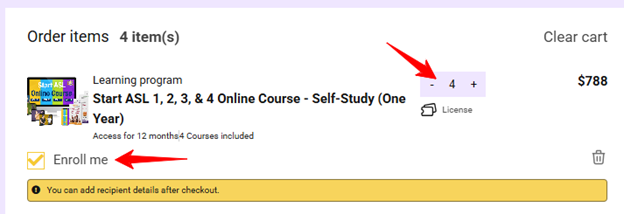
Enter the number of licenses needed.
Review any automatically applied volume discounts.
Complete checkout.
If you would like one of the licenses assigned to yourself, select the Enroll Me option during checkout.
Assigning Licenses to Students
After completing your purchase:
Log in to your account. https://learn.startasl.com/account
Visit the Licenses section.
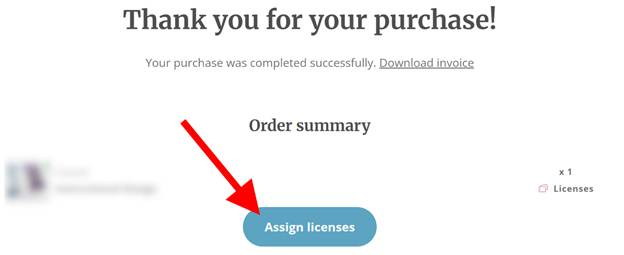
Select Assign Licenses.
You may also access the Assign Licenses page directly from the purchase confirmation page.
Sending Licenses
When assigning licenses:
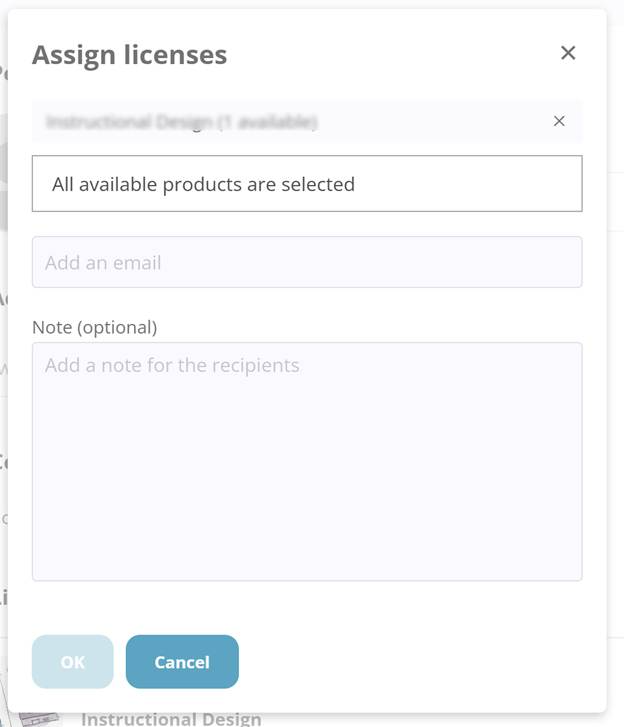
Select the product.
Enter one or more student email addresses.
Optionally include a personal message.
Send the invitations.
Each recipient will receive instructions for accessing their course.
Can I Assign Licenses Later?
Yes.
Unused licenses remain available in your account until they are assigned.
You can return at any time and distribute licenses when ready.
When Does Course Access Begin?
For courses with a fixed access period, the access period begins when the student is enrolled and gains access to the course.
This allows schools and organizations to purchase licenses in advance and assign them later when needed.
How can I view student progress and grades?
For many schools and groups, student grades can be viewed through the Start ASL platform. See our Viewing Grades & Assignment Feedback article for individuals and small groups.
For groups of 25+ online course students, eligible Bulk License Reporters, Seat Managers, and approved group administrators may be able to view student progress and grades through the Start ASL administrator dashboard.
This can include overall course progress, average grades, and individual assignment or quiz completion details, depending on the group setup and student enrollment type.
Dashboard access is not included with every purchase and must be set up with the appropriate group permissions. For step-by-step instructions, see: How Bulk License Reporters and Seat Managers Can View Student Grades.
Need a Quote Instead?
If your organization requires:
A Purchase Order
An invoice
Enrollment assistance
A larger group solution
Consider submitting a School Quote Request instead of purchasing licenses directly online.