
Overview
Managed Accounts are available for qualifying school, organization, and group enrollments of 25+ online students that require centralized student management.
If your organization has been provided with a Managed Account, you can enroll students, manage available seats, and monitor student progress from your administrator dashboard.
If you purchased School Licenses instead of a Managed Account, please see our article on purchasing and assigning School Licenses.
Before You Begin
You should have already:
Requested a school quote
Completed your order
Received confirmation that your Managed Account has been set up
Received an email to create your administrator password
Once your account has been activated, you can begin enrolling students.
Adding Students
Step 1: Log In
Log in to your Start ASL account. https://login.startasl.com
Step 2: Open Your Dashboard
Visit your administrator dashboard (https://learn.startasl.com/author/welcome) or Top Menu > My Account > Group Leaders).
From your dashboard, select:
Manage Seats
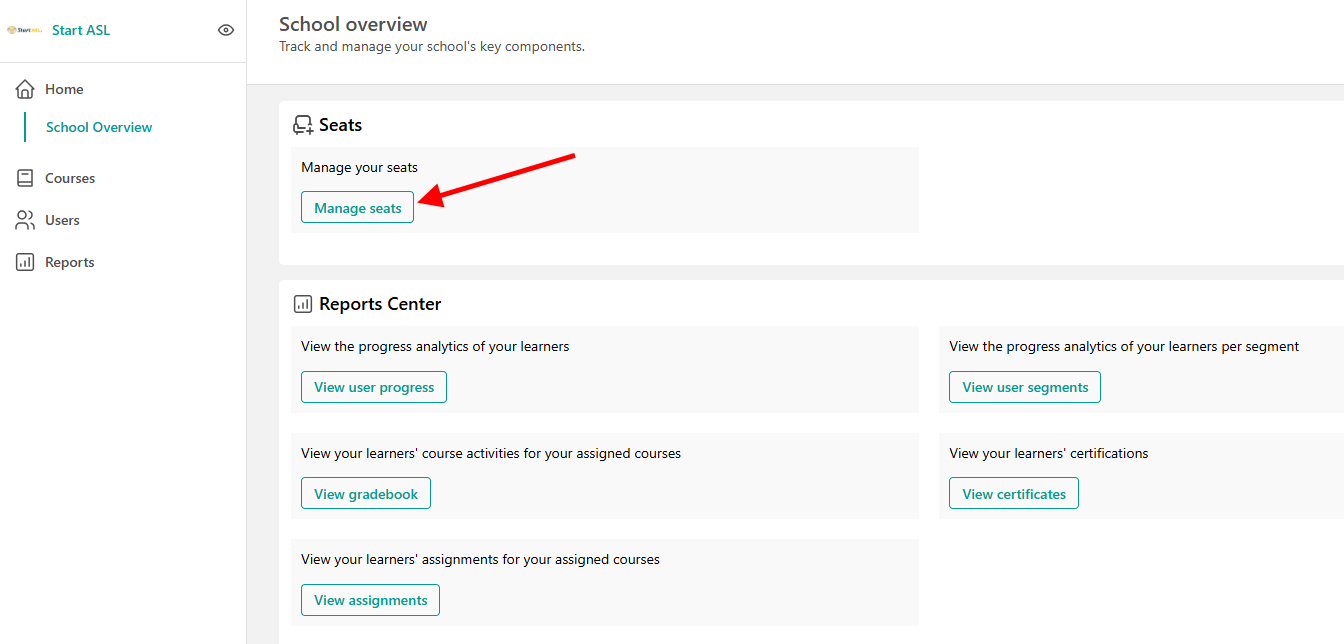
Step 3: Add a Student
Click:
Add Member
Enter the student's:
First Name
Last Name
Email Address
Then select:
Enroll User
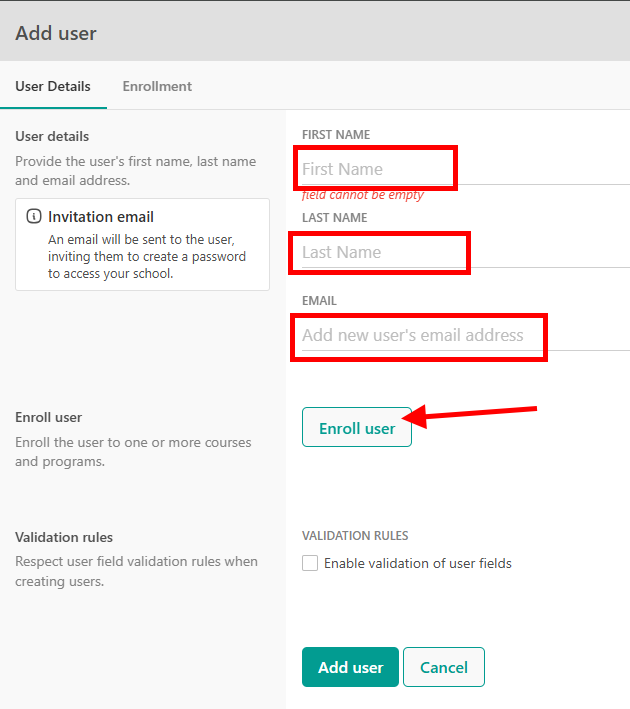
Step 4: Assign a Course Seat
When enrolling the student:
Check Add to Seat
Select the course you want the student enrolled in
Confirm the enrollment
Click:
Add User
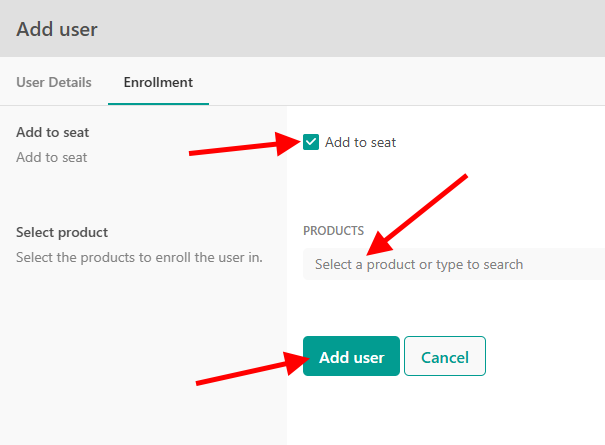
Step 5: Student Receives Access
The student will automatically receive an email invitation.
Using the invitation, the student can:
Create their password
Access their account
Begin their course
Viewing Student Progress and Grades
Eligible Bulk License Reporters, Seat Managers, and approved group administrators may be able to view student progress and grades through the Start ASL administrator dashboard.
This can include overall course progress, average grades, and individual assignment or quiz completion details, depending on the group setup and student enrollment type.
Dashboard access is not included with every purchase and must be set up with the appropriate group permissions. For step-by-step instructions, see: How Bulk License Reporters and Seat Managers Can View Student Grades.
Completion Certificates
Students who successfully complete eligible courses may receive Completion Certificates.
Administrators may be able to view certificate status through their dashboard.
Schools determine whether certificates will be accepted for credit or program requirements.
Frequently Asked Questions
What Is a Managed Account?
A Managed Account allows a school or organization to centrally manage student enrollments and monitor student progress.
How Do Students Access Their Courses?
Students receive an email invitation after enrollment.
They use that invitation to create their account and access their course.
Can I Add Students Later?
Yes. Additional students can be added at any time, provided seats are available in your account.
Can I View Student Progress and Grades?
Dashboard access is not included with every purchase and must be set up with the appropriate group permissions. For step-by-step instructions, see: How Bulk License Reporters and Seat Managers Can View Student Grades.
What If a Student Does Not Receive Their Invitation Email?
First, ask the student to check their spam or junk folder.
If the invitation cannot be located, please contact Start ASL support for assistance.